New option to show the eye-catcher at a chosen section of the page
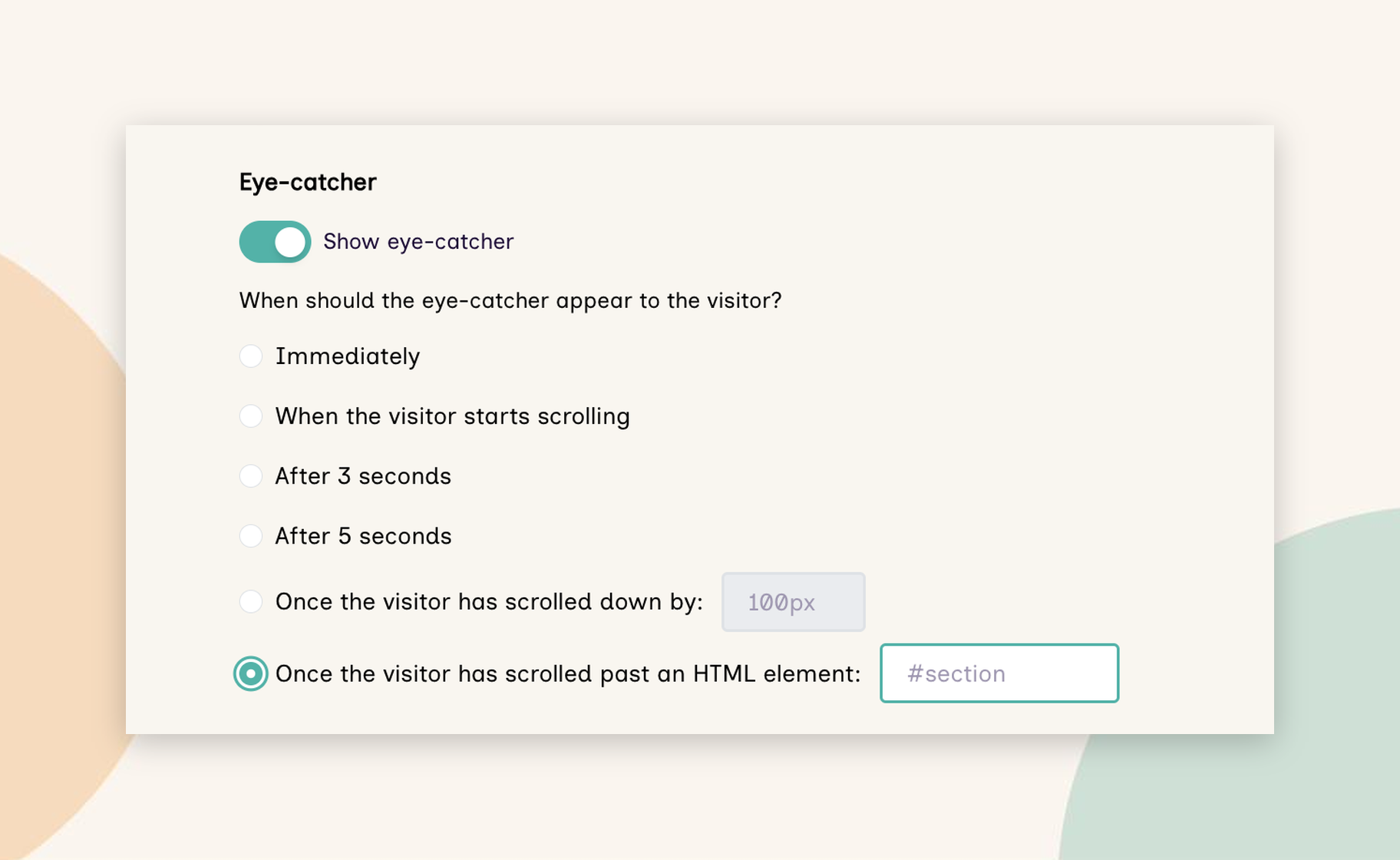
You can now set an eye-catcher to appear once an appointed section of a page becomes visible to your visitor - for example, your awards section. Find the setting in the Activation tab in Flow Builder, where you can set a target element ID.
You could already show the eye-catcher after a few seconds, or once a website visitor had scrolled a set distance down the page. Those options don't always work as well on mobile, where page lengths vary. Tying the eye-catcher to a section means it appears when website visitors reach the part of the page that matters, such as a video from your sales team as they reach the floorplan, or a message from your awards host as they reach the shortlist.
Quick-switching between recent Flows
In Flow Builder edit mode, hover over or click the Flow name to jump between your most recently modified Flows in the same tab.
If you're updating several Flows at once – say, refreshing last year's exhibitor and delegate journeys for a returning annual event - you can move between them without going back to the Flows list each time.
Tell us what you think
As ever, we'd love to hear how you're putting these updates to use, and what you'd like to see next. Get in touch at product.feedback@reelflow.com – we read every message.